I Just Wanted to Stop Copy-Pasting YouTube Links. Somehow, I Built a Pixel Town.
How a tool for analyzing YouTube videos became an AI reading site, and then a little town inspired by the games I grew up with.
It started with something pretty boring.
I watch a lot of AI interviews, product conversations, and technical talks on YouTube. Some run for an hour or two. Often only a few minutes connect to what I'm actually thinking about right now, but I don't want to miss them. Sometimes I want to understand a technical concept; sometimes I want to know whether someone's prediction actually holds up.
So I'd paste the link into ChatGPT and start asking questions. One interview would lead to another, and I'd do it all over again.
Eventually, I noticed how much of this I kept repeating: find the video, copy the link, paste it into ChatGPT, explain what I wanted, organize the answer. A few days later, when I wanted to revisit an idea, I'd have to dig through my chat history.
The channels I followed were fairly consistent. So were my questions.
Why couldn't an agent handle the repetitive part?
01. Handing off the repetition
The first version was straightforward. When a channel I followed published a new video, an agent would grab the video info and transcript, analyze it with criteria I'd set up, and save the results.
I no longer had to check each channel or keep pasting links into a chat.
As I write this, the library has more than 600 video analyses, including episodes from Lenny's Podcast, How I AI, and other AI, product, and tech channels I follow.
Getting more content turned out to be the easy part. Getting useful content was harder.
AI can produce a lot of writing that sounds reasonable and tells you very little.
An hour-long interview might get boiled down to "AI is transforming the industry" or "Businesses need to embrace innovation." Fine. But what am I supposed to do with that?
Sometimes a guest's hunch would come out of the summary sounding like established fact. Very different videos would somehow end up with remarkably similar conclusions.
I'd wanted to spend less time filtering information. Now I was filtering the analyses instead.
So I kept refining the criteria: what was worth keeping, what just repeated something already covered, how to separate evidence from opinion, what a technical development actually changed, and which projects or original sources deserved a closer look.
Different kinds of content needed different treatment, too. A deep research interview and a product announcement shouldn't go through the same template.
After many rounds of tweaking, the library finally fit the way I read, and took most of that daily busywork off my hands.
These days I usually start by skimming the analyses on the site to decide what's worth going deeper on. If something catches my interest, I go to the original article or video, or take my questions to GPT for a longer discussion. It helps me get a sense of a piece before deciding how much time to spend on it.
02. Turning a personal library into a website
At first, all of this was just for me. Then friends asked whether they could read it too. The content was already there, so I gave it a website.
That was the beginning of what became Idoia's Briefly Town.
The site started with YouTube interviews and research. Later, I added daily AI news, a weekly games-industry report, and a list of GitHub projects worth trying.
It might sound like a random mix, but it all ties back to what I care about and work on. I work in product, and I also build AI and game projects on the side. When I read about an AI development, I want to know what it makes possible. When I find a GitHub project, I want to know whether it's worth trying myself. Something happening in games often sparks an idea for my own product work.
I never meant to build an AI news portal that covers everything. It's just the stuff I want to read every day, in one place, with an agent doing the first pass.
The website itself was conventional: categories, lists, articles, and search. Find something interesting, click, read.
03. Turning the site into a pixel town
Then I came across Retro Game Portfolio by Daniele Tortora, a personal portfolio you can explore like an adventure game.
I loved it, forgot to save it, and later had to ask GPT to help me find it again.
Opening it again brought back the Japanese games I grew up with, especially Tokimeki Memorial, a 90s Japanese dating sim. I remembered the pixel art, the small towns, the different places to visit, the conversations with characters, and all the little details hidden around the map. None of it was especially complicated, but it made me want to stay a little longer.
I started wondering what my reading site would look like as a town.
AI news could live in the AI Newsroom. Research interviews could go in the Research Lab. Games coverage could have a home at Game Watch, and GitHub projects could move into the Code Club. There could even be a few NPCs to meet along the way.
A few days later, the site had streets, buildings, little characters, and dialogue boxes.
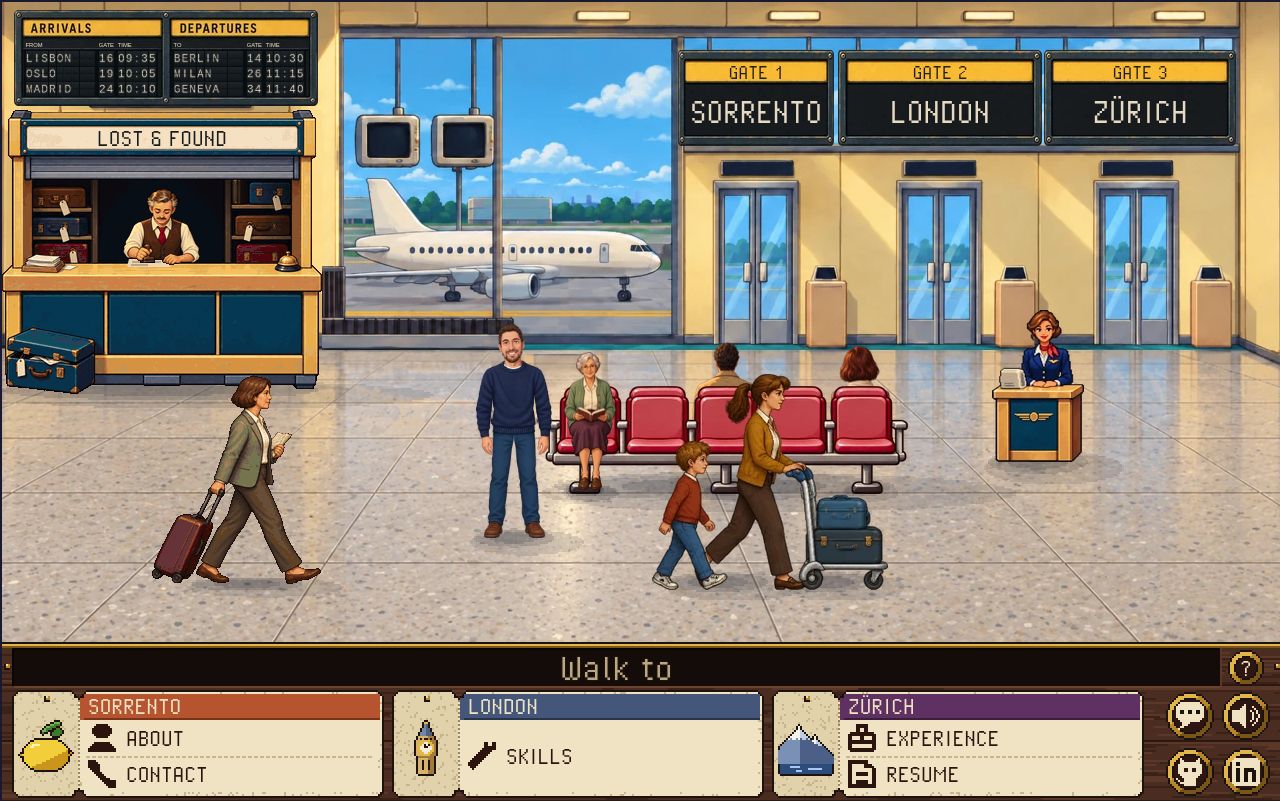
The inspiration: Daniele Tortora’s Retro Game Portfolio, shown in its current version.
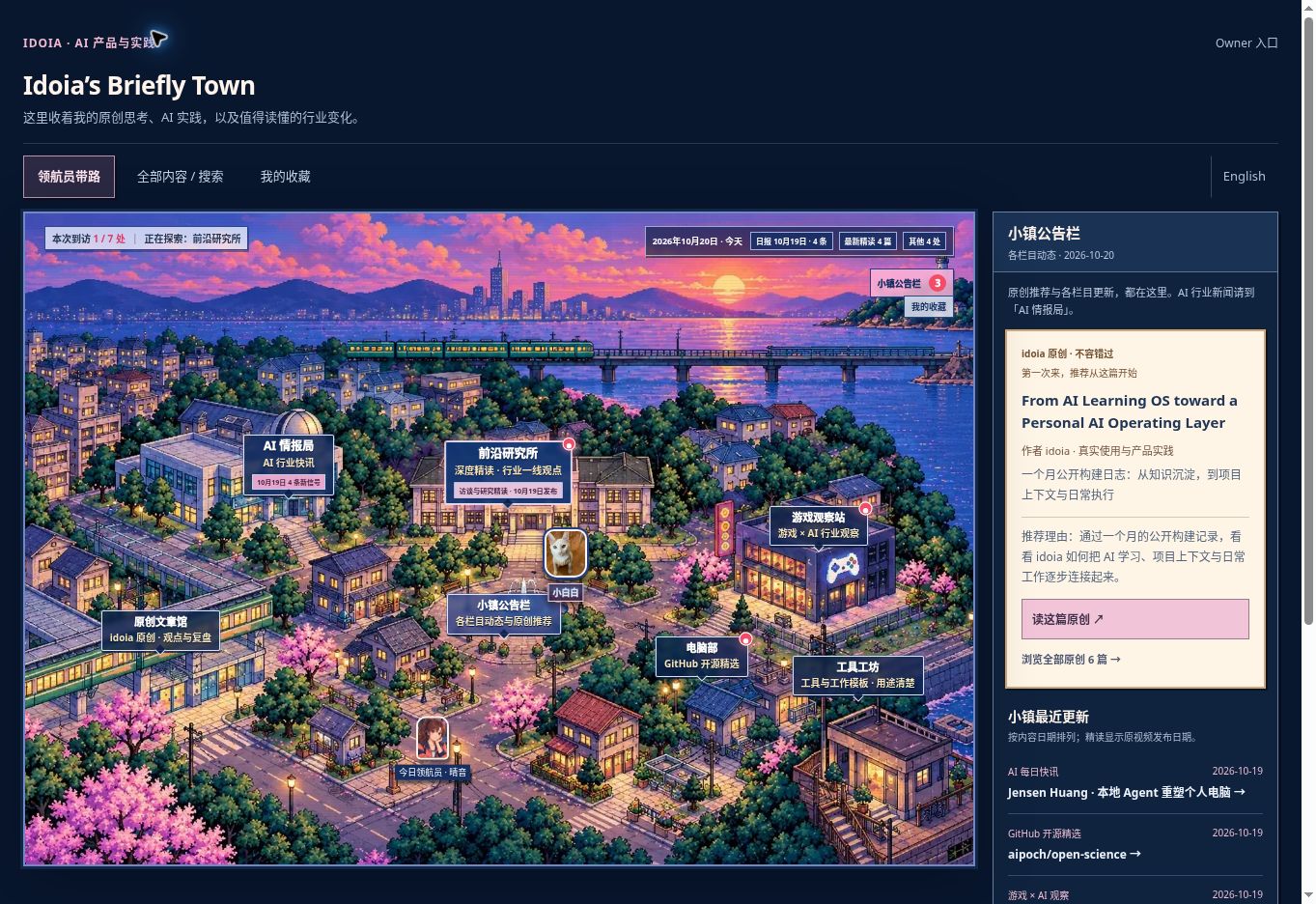
My own town today, with different buildings leading to different collections.
Watching my little character walk around town for the first time was genuinely fun.
It also raised another question: what else could this format add?
04. Making it fun without getting in the way
The first version mainly changed how you reached the content. You walked a character to a building, clicked, and a panel opened. The reading experience underneath was still the original site.
That helped clarify a design choice: exploring the town could be fun, but finding an article shouldn't mean navigating a map.
So I kept the lists and search.
If you feel like wandering, you can wander. If you want to find something quickly, you can go straight to the directory.
05. Next: keeping the deep dive inside the town
I find things in the town, but the deeper conversation usually happens in GPT.
So I recently connected the town's NPCs to an LLM and started bringing the site's existing analyses into the conversation. I want to see whether I can go from finding something interesting to working through it and asking follow-up questions, without moving everything into another chat. Connecting a model is only the beginning. I'm still testing whether the experience is good enough to make me stay.
A deeper question is what it should remember: what I've read, what I'm working through, which questions are still open. When I use AI to learn, things often feel clear in the moment and fuzzy a few days later. If the NPC remembered, it could say something like this when a related piece shows up:
"Weren't you looking into this last time? There's something new today that might be related."
The hard part is deciding what counts, and when to update it.
Reading an article doesn't mean understanding it. Understanding it today doesn't mean remembering it next month.
Interests change. A misunderstanding from one conversation shouldn't become a permanent record of what someone knows. Some questions matter over time; others are passing curiosities.
That's the part I'm still experimenting with.
06. What you can explore today
Briefly Town currently brings together video analyses, daily AI news, a weekly games-industry report, GitHub projects worth trying, and my own articles.
You can explore the buildings, or use the directory and search. The LLM-powered NPC conversations and learning memory are still a private experiment and aren't open to visitors yet.
You can explore the town in English and read two English essays. Most of the reading library is still in Chinese.
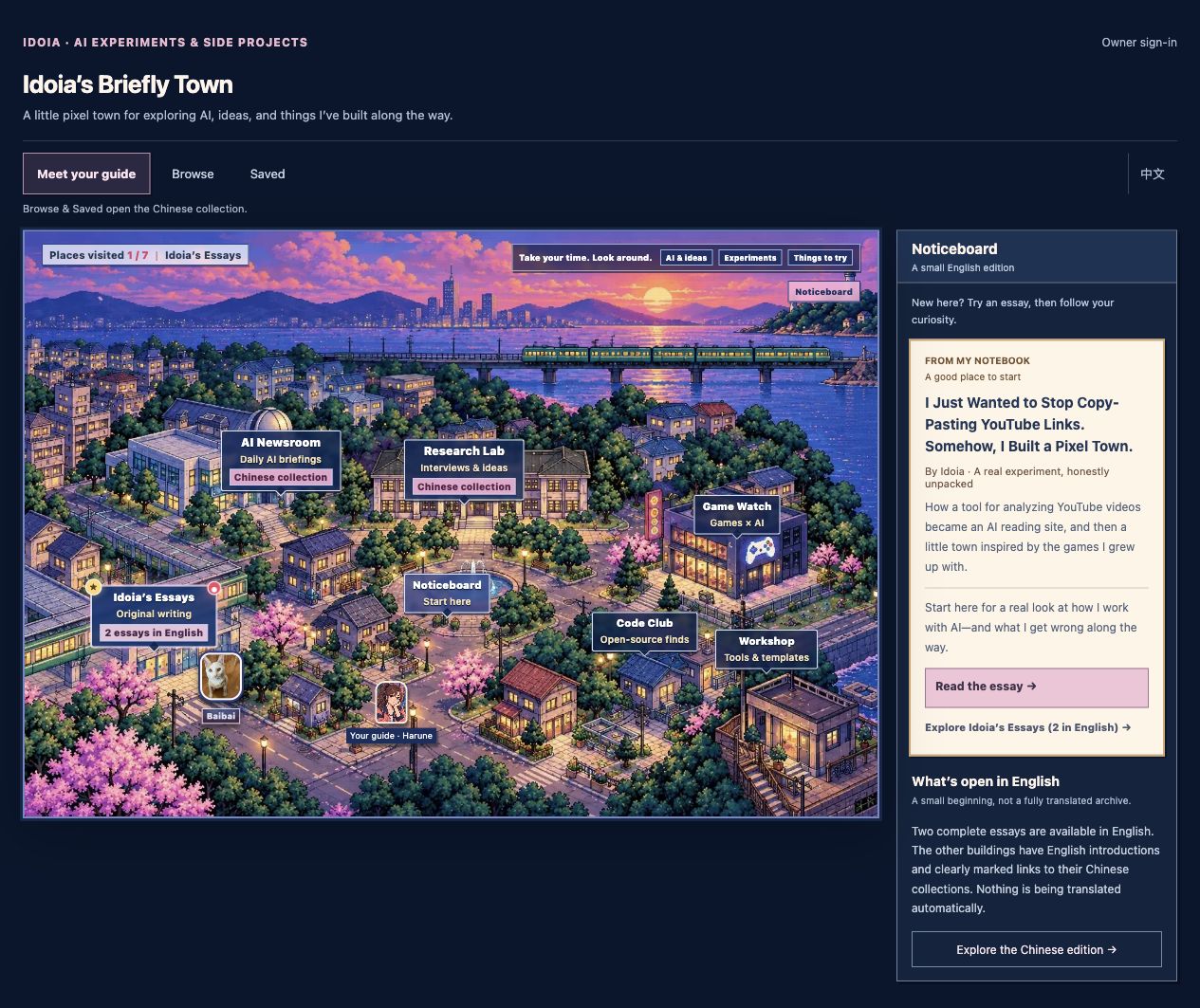
Briefly Town today — English edition.
I started out wanting to paste fewer YouTube links. Somehow, I ended up thinking about whether an NPC should remember what I learned last week.
Productivity aside, I just like spending time in this little town.
Idoia · October 2026
Inspiration: Retro Game Portfolio by Daniele Tortora